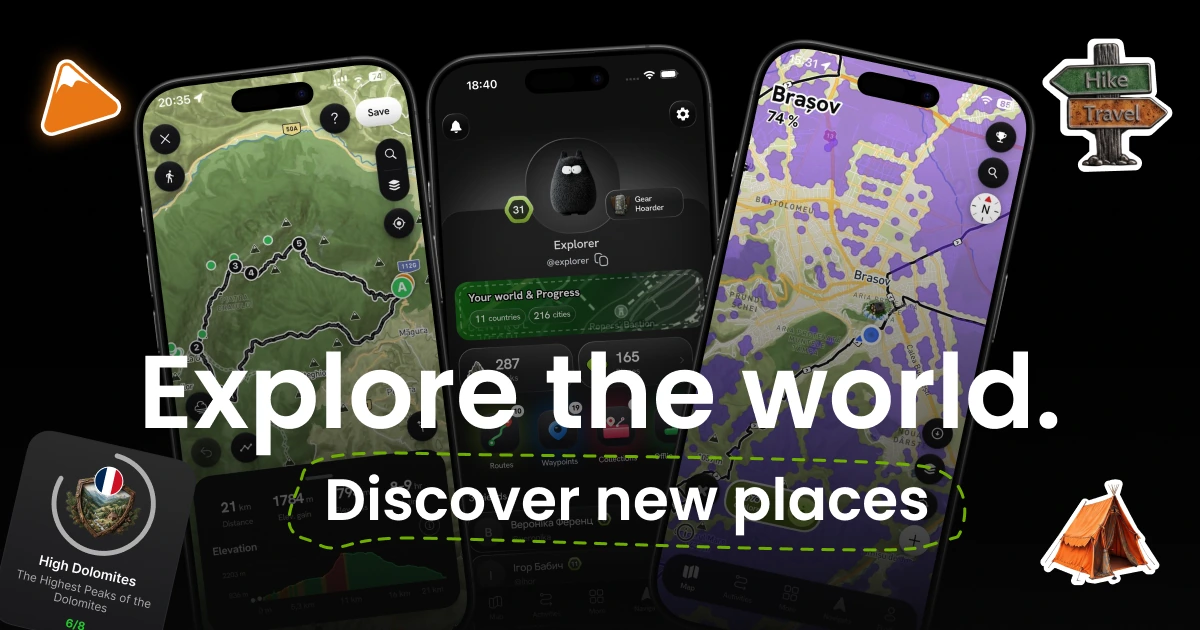
Wayly — explore your world
A map tracker that turns everyday walks into world exploration — on the phone and in the browser.
A fitness tracker and a fog-of-war map in one — every walk uncovers territory on your own map of the world. Designed and built solo, for mobile and the web.
The market is split in half — and nobody bridges it.
Trackers like Strava log a run and the map goes dead. Explorer apps reveal the map but have no real workouts. Wayly joins the two: every walk adds to a personal map you light up.
Constraints I designed around from day one.
Building solo means every constraint is also a design decision.
One codebase, two platforms
Solo build → iOS and Android from a single stack. That choice (Flutter) shaped the component model before the first screen existed.
Background GPS eats battery
The #1 killer in this product category. It had to be a design constraint, not a bug found after launch.
The map must always stay primary
So the whole UI is an overlay on top of the map — never separate pages that replace it.
Offline is the real use case
Trails and mountains have no signal. Recording must work with no internet and sync later.
Not "design it, then hand it off."
I owned the whole loop — from strategy to the code running on a real phone.
Product strategy
Concept, persona hypotheses, a four-phase roadmap and the monetization model.
UX architecture
Screen map, navigation, state machines and edge cases — specified before the UI.
Design system & UI
Tokens, typography, spacing and components — authored as a real Flutter theme, not a static library.
Interface engineering
Building the app in Flutter (Riverpod, Go Router), integrating the map, GPS and the fog layer.
Five calls that defined the product.
Hexagons, not a square grid
The fog had to read well on a single street and on a whole country.
An H3 hexagon grid (~50 m cells) — every GPS point lights up one cell.
One mechanic that stays legible at every zoom level — no second visual language needed.
A track that uncovers fog
In fitness apps a finished run becomes just another row in a list.
Recording is wired into the fog — every point of a track reveals the map around it.
Each walk visibly adds to your map, so the reason to go out again is built into the core loop.
The route builder as a state machine
Route planning is the deepest flow — the easiest place to leave people at a dead end.
Modelled as states (Planning → Preview → Navigating), with every unhappy path designed up front.
The deepest flow shipped without dead ends — every edge case already had a screen.
Usage rules, not just a palette
A growing app drifts visually when screens are designed one-off.
A dark, map-first system with strict colour rules: green means progress, amber means rewards.
New screens are assembled from the system, not redesigned — users learn the colours once.
Peaks — built on what users told me
Feedback showed people want one place to collect, keep and track the peaks they climb — and Wayly was becoming that place.
Peaks grew from a counter into a full feature: range collections, detailed stats, gamified badge reveals and share cards.
Every summit now adds to a collection, a statistic and a story — a reason to come back and something people want to share.
The same world, now in the browser.
Not a marketing page — the product itself at wayly.cc: one account, the same map and fog, rebuilt for a big screen and a mouse.
Tracks and routes become links that open in any browser — no install needed to see what someone explored.
From concept to a product on a phone and the web.
Flutter app for iOS and Android — map, fog, tracking, routes, profile and rewards.
Web version at wayly.cc on the same account.
Design system in code — one source of truth for both platforms.
Paid tier live in the stores, with the user's own data free forever.
Design-as-code collapses the loop.
When the system lives in code, handoff losses disappear — and the decisions that define the product stay human.